A rent ledger is a running record for one tenant that lists every rent charge and every payment, with the balance after each line. It shows what rent is due, what you have received, and whether any balance remains.
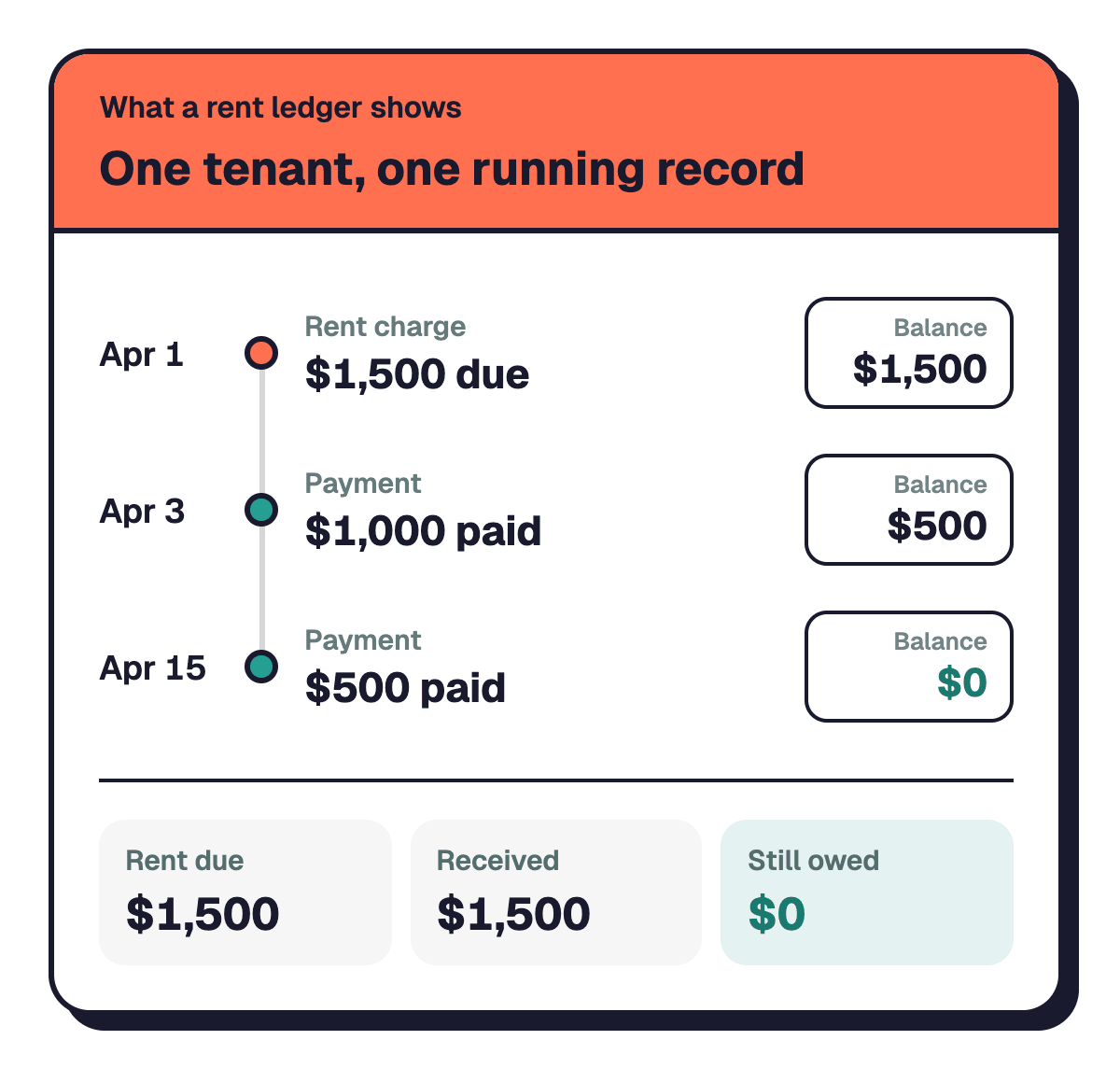
If you are renting out your first property, you can start a rent ledger with a notebook, a spreadsheet, or an app. You do not need an accounting background to keep the record clear.
This guide includes a rent ledger example, explains what each column means, and shows how to create and maintain your own record. You will also learn how to record a partial month when a tenant moves in after the start of the month.
Key Takeaways
- •Create one rent ledger for each tenant, with a separate line for every rent charge and payment.
- •Use columns for the date, description, amount due, amount paid, and running balance.
- •Record rent due on its due date, then record each payment on the day you receive it.
- •Update the balance after every line so you can see whether the tenant has paid in full.
- •For a tenant who moves in mid-month, start with a partial-month rent charge based on the prorated rent calculator.
Rent ledger meaning: What is a rent ledger?
A rent ledger is a dated list of rent charges and payments for one tenant, including the balance after each entry. It gives you a running record of how much rent you have charged, how much you have received, and what remains unpaid.
Think of it as a simple account history for one rental agreement. Each line records a rent charge or a payment, and the balance carries forward to the next line.
A rent ledger helps you:
- See which rent charges you have recorded.
- Match payments to the dates you received them.
- Check the remaining balance without reviewing every transaction from the beginning.
- Review a tenant's payment history when updating your rental records.
- Keep a clear record for your own bookkeeping and future reference.
Keep each tenant's ledger separate. If you rent out multiple units, separate records help you avoid mixing up payments between tenants or properties.
Rent ledger example: How to read a rental ledger
A rent ledger example shows how rent charges and payments change the balance over time. The example below uses a monthly rent charge and several payments to show how the balance moves from one entry to the next.
Example:
- March 1: rent due $1,500. Balance $1,500.
- March 1: payment $1,500. Balance $0.
- April 1: rent due $1,500. Balance $1,500.
- April 3: payment $1,000. Balance $500.
- April 15: payment $500. Balance $0.
- May 1: rent due $1,500. Balance $1,500.
- May 2: payment $1,500. Balance $0.
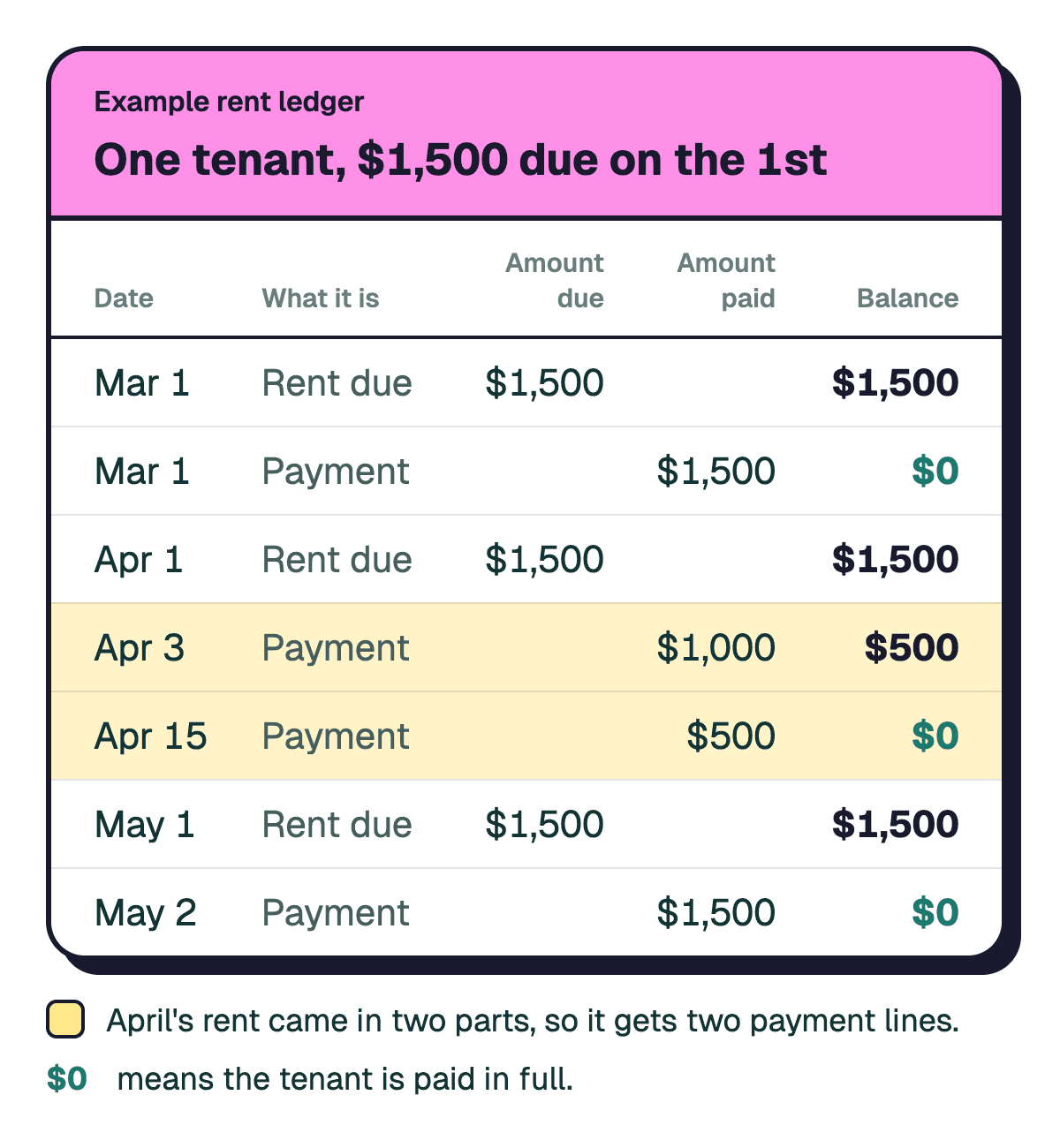
The balance shows what remains after each charge or payment. When you record a rent charge, add that amount to the previous balance. When you record a payment, subtract the amount received from the previous balance.
In this example, the April payment arrives in two parts. The first payment reduces the balance, and the second clears what remains. The May charge starts a new balance after the earlier balance reaches zero.
Use the same approach for your own ledger. Enter each transaction in date order, and do not replace an earlier line just because a later payment changes the balance.
How to make a rental ledger
You can make a rental ledger in a notebook, a spreadsheet, or an app. Choose a format you can update consistently, then use the same columns for every tenant.
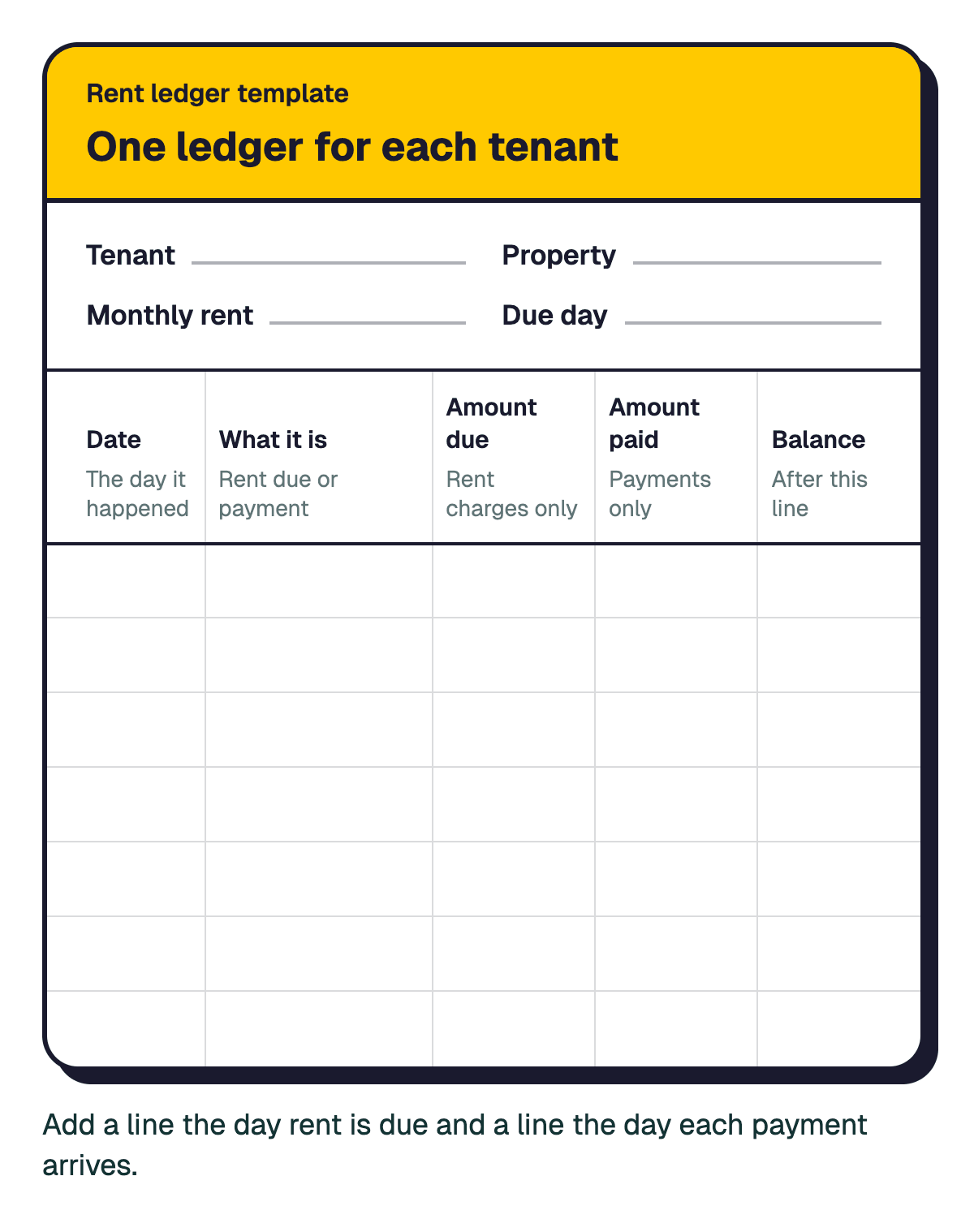
Start with these five columns:
- Date: The day rent is charged or a payment is received.
- What it is: A short description, such as rent due or payment.
- Amount due: The rent charge recorded on that line.
- Amount paid: The payment received on that line.
- Balance: The amount remaining after the charge or payment.
Leave the amount due blank on payment lines and the amount paid blank on rent charge lines. This makes each entry easier to read.
Follow these steps to set up your ledger:
- Create a separate ledger for each tenant.
- Add the five columns to your notebook, spreadsheet, or app.
- Enter a rent charge on the day rent is due.
- Enter a payment on the day you receive it.
- Update the running balance after each entry.
- Keep supporting records with your bookkeeping so you can check an entry later.
For a spreadsheet, use one row per transaction. Keep the dates in order and avoid putting several payments into one line. If a tenant makes separate payments, record each payment separately.
For a simple way to record expenses alongside rent activity, use the rental property expense spreadsheet. Keeping rent records and expense records organized helps you review the property's financial activity in one place.
Tenant ledger example: What if a tenant moves in mid-month?
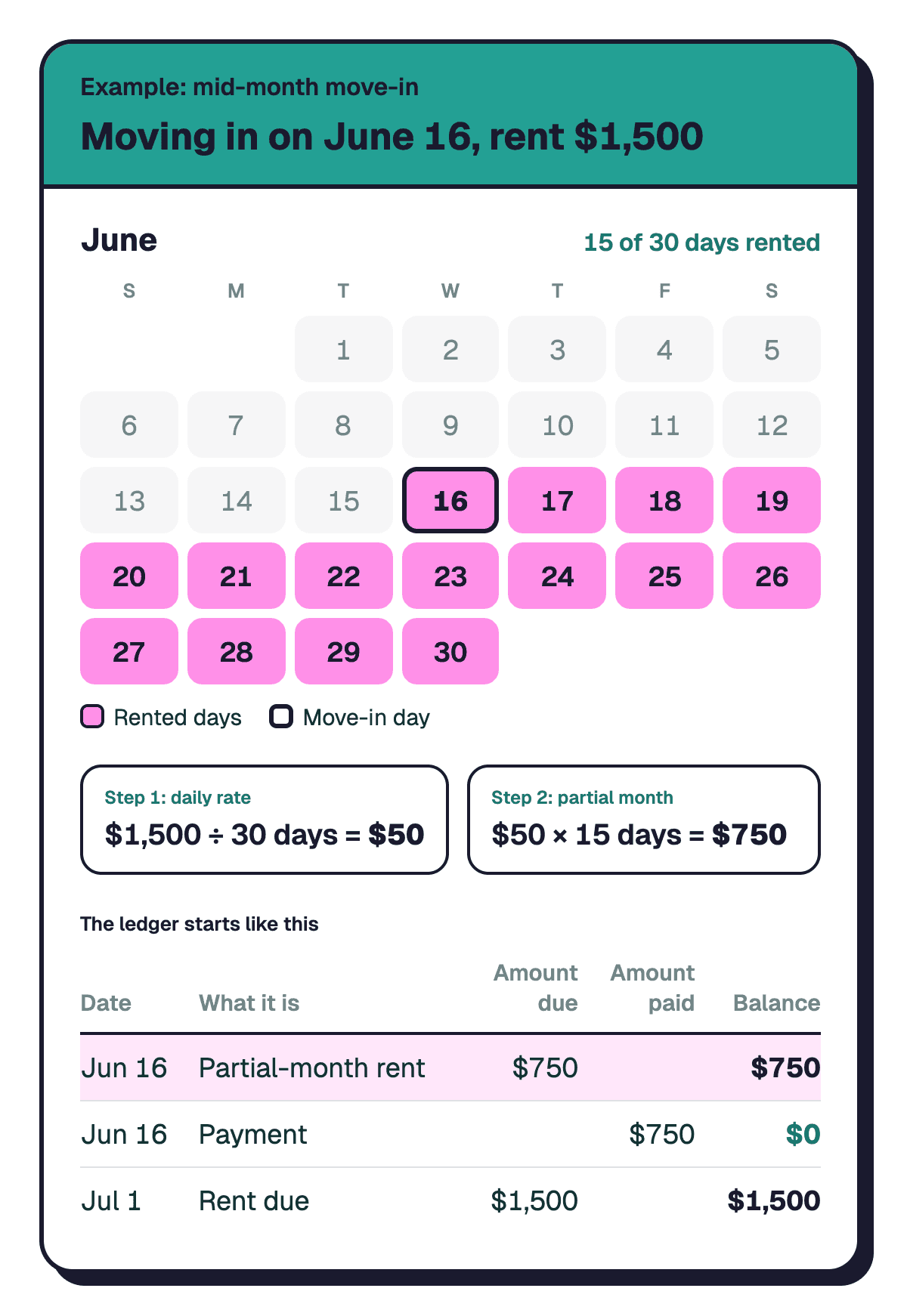
A tenant ledger example for a mid-month move-in starts with a partial-month rent charge instead of a full month's rent. Partial-month rent, also called prorated rent, is an amount adjusted to cover only part of a rental month.
Work out the partial-month amount before entering the first charge. Use the prorated rent calculator to calculate the amount for the dates that apply to your rental.
Then add the result to the tenant's ledger as the first rent charge. Record the date, describe the entry as partial-month rent, enter the amount due, and update the balance.
After that, continue using the same process as any other month:
- Record the next rent charge on its due date.
- Record each payment on the day it arrives.
- Update the balance after every entry.
- Keep the partial-month entry in the ledger rather than removing it when the next month begins.
This gives you a continuous record from the tenant's first charge onward. It also makes the first month easier to review if you need to check how the starting balance was calculated.
How to keep a rental ledger and track rent payments
The key to keeping a rental ledger is to update it whenever rent is charged or a payment comes in. A ledger that stays current gives you a clearer view of each tenant's balance than a record updated only occasionally.
Use this routine:
- On the rent due date: Enter the rent charge and update the balance.
- When a payment arrives: Record the date and amount received, then update the balance.
- When a payment covers only part of the balance: Record the amount received and leave the remaining balance visible.
- When the balance reaches zero: Check that the recorded charges and payments account for the full amount.
- When reviewing your records: Compare ledger entries with your payment records and correct any mistakes.
Keep the original details for each transaction. If you discover an error, make the correction clear rather than quietly changing an old entry. That way, you can understand why the balance changed.
The IRS explains why keeping business records matters in its Recordkeeping guide.
A notebook or spreadsheet works if you prefer to enter every transaction yourself. An app can help if you want rent charges and payments recorded alongside other property records.
Tip: Set a regular time to review each tenant's ledger. A short check after rent is due can help you spot missing entries before they pile up.
Start your rent ledger before the first rent charge, and add each charge and payment as it happens. Keeping the record current gives you a clear account history for each tenant and makes it easier to check a balance when you need it.
Rentlab helps you keep rent and expenses organized by property, with each tenant's rent line created monthly on its due day. Unpaid rent is marked overdue the day after, and the auto-log feature can record a reliable tenant's rent as paid on the due date. You can use Rentlab in your phone's browser. Get started free. Free for up to 2 units. No credit card required.
FAQ
Sources
Ready to simplify your rental property bookkeeping?
No credit card required